Snap to specific points on the objects
Status bar -- Object Snap
When Object Snap is ON, background color is light blue
Right-click on the Object Snap icon
A list of 13 object Snap pop-up
The one with the blue square mean is ON
Select Settings
Snap to the closest endpoint or corner of a geometry object, like Line, Arc
Snap to the midpoint of a geometry object, like Line, Arc
Snap to the center of an Arc, Circle, Ellipse, Elliptical Arc
You must hover the cursor near the edge of an arc to show the center point
Snap to a Point Object, Dimension Definition Point, Dimension Text Origin
 Snap to an Arc, Circle, Ellipse, Elliptical Arc
Snap to a common point of multiple geometries
Hover on a point and move along the path, causes a temporary extension line or arc
You also can get an intersection from 2 extension lines
Snap to the insertion point of objects like Text, Block, Attribute
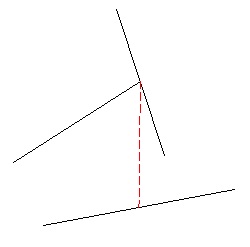
Snap to a point perpendicular to the selected geometric object
Pick a point for line then move cursor on another line object to make it perpendicular
Pick a point from the line object, then snap the 2nd point to other geometric object
This will draw a line perpendicular to the 1st line object
Snap to an Arc, Circle, Ellipse, Elliptical Arc
Snap to a common point of multiple geometries
Hover on a point and move along the path, causes a temporary extension line or arc
You also can get an intersection from 2 extension lines
Snap to the insertion point of objects like Text, Block, Attribute
Snap to a point perpendicular to the selected geometric object
Pick a point for line then move cursor on another line object to make it perpendicular
Pick a point from the line object, then snap the 2nd point to other geometric object
This will draw a line perpendicular to the 1st line object
Snap to the tangent of an Arc, Circle, Ellipse, Elliptical Arc, Polyline Arc, Spline
You can either start a point then snap the 2nd point tangent to an Arc or Circle
Or, start a tangent point from an Arc or Circle, then snap to other geometric object
Snap to the nearest (any point) point of an object, like an Arc, Circle, Ellipse, Elliptical Arc, Line, Polyline, Spline, Point object
Snap to the visual intersection of 2 objects that do not intersect in 3D space, but appear to intersect in 2D space
Constrains a line or polyline segment's angle to be same to another linear object
Pick a point from the line to be parallel
Move away until the parallel icon reappear again, an infinite continuous dotted line appear
Move along the infinite line to pick any point